

Es gibt etwas, das besser ist als ein Raspberry PI, und das ist ein Raspberry Pi i2s DAC!
EINFÜHRUNG: WARUM DER RASPBERRY PI I2S DAC DIE RICHTIGE WAHL IST
Ich bin mir zwar bewusst, dass es auch andere Dinge geben könnte, die unserer Freude wert sind, aber dieses Mal konzentriere ich mich nur auf das Zauberwort, das Audiophile irgendwo und irgendwann einmal gehört haben sollten... Also, worüber reden wir?
I2S ist ein Kommunikationsprotokoll, das speziell für die Übertragung von digitalen Audiodaten entwickelt wurde. Um aus Wikipedia zu zitieren
I2S, auch bekannt als Inter-IC Sound, Integrated Interchip Sound oder IIS, ist ein elektrischer serieller Bus-Schnittstellenstandard, der für die Verbindung digitaler Audiogeräte untereinander verwendet wird. Er wird für die Kommunikation von PCM-Audiodaten zwischen integrierten Schaltkreisen in einem elektronischen Gerät verwendet. Der I2S-Bustrennt Takt- und serielle Datensignale, was zu einem geringeren Jitter führt als bei Kommunikationssystemen, die den Takt aus dem Datenstrom wiederherstellen.
Zur besseren Erklärung: i2s wird in all Ihren schicken CD-Playern verwendet und verbindet den Lesemechanismus mit dem DAC und\oder dem S\PDIF-Ausgang. Am wichtigsten ist jedoch, dass i2s auch bei allen eigenständigen DACs verwendet wird, denen Sie begegnen. Wenn es sich um USB handelt, ist i2s der Weg vom USB-Empfänger zum DAC-Chip selbst, bei S\PDIF das Gleiche wie oben. Sie ahnen schon, warum wir darüber sprechen?
So klar wie möglich: I2S ist das Protokoll der Wahl, wenn es um die Übertragung von digitalen Audiosignalen geht. Ich könnte noch hinzufügen, dass die Verwendung von USB als Verbindung im Audiobereich weit davon entfernt ist, eine ideale Situation zu sein. Und selbst wenn es so wäre, hat eine I2S-Direktverbindung einen großen Vorteil: Der Signalweg ist kürzer. Siehe diese Beispiele:
Szenario 1: Mein kleiner Raspberry Pi (natürlich mit Volumio betrieben) ist an einen Zillionen-Dollar-USB-DAC angeschlossen, der meinen interstellaren Verstärker speist.
Meine kostbaren Einsen und Nullen sind auf diesem Weg:
Raspberry Pi -> USB-Bus -> USB-Kabel -> Zillion-Dollar-USB-Empfänger -> I2S -> Zillion-Dollar-DAC -> Interstellar-Verstärker
Das ist ein ziemlich weiter Weg, nicht wahr? Nimmt man dann noch alle Probleme hinzu, die mit den Verbindungsschnittstellen zusammenhängen, bekommt man eine ziemlich gute Vorstellung davon, was hier passiert.
Szenario 2: Mein kleiner Raspberry Pi (Sie wissen, was hier kommt...) hat einen winzigen DAC, der über eine I2S-Verbindung angeschlossen ist und meinen Verstärker mit vollem Verstand versorgt
Der Fluss meiner Nullen und Einsen?
Raspberry Pi -> I2S -> DAC -> Full-of-common-sense-Verstärker
Ich bin sicher, dass Sie jetzt die Wahrheit tief in Ihrem Herzen spüren, und die Kraft ist mit Ihnen. Aber es gibt mehr zu kommen, um es zusammenzufassen und kürzer zu machen, das sind die wichtigsten Vorteile eines Raspberry Pi i2s DAC Setup:
- Idealer Signalweg: kürzere Signalwege und Schnittstellen (USB, S/PDIF) werden vermieden
- Wir verwenden nicht den lästigen USB-Bus des Raspberry PI, betrachte das Knacken und Klicken als eine Sache der Vergangenheit
- Günstige und dennoch gut klingende Anlage: 80 Dollar für eine umwerfende Preis/Qualitäts-Kombination
UPDATE
Dieser Artikel wurde 2014 geschrieben, und seitdem sind neue und bessere i2s DACs aufgetaucht. Glücklicherweise haben wir jetzt eine Auswahl der besten von ihnen hier im Volumio . Um Ihnen also die Mühe der Recherche und des Vergleichs zu ersparen, finden Sie unten meine persönliche Auswahl der besten 4 I2S-DACs für Raspberry PI aufgelistet.
[products skus="BOSSDAC, MBLSDAC, Pi-DAC+, DACPLUS-RCA, JBM-001″]
Und natürlich die Allo-Bundles mit dem kleinen Wunder, das der Kali ist:
[products skus="KAP21PS, KAPHFDPS"]
DIE OPTIONEN
Nun, da Sie über Raspberry Pi i2s DAC-Wunder aufgeklärt sind, lassen Sie uns die Optionen sehen, die wir haben:
RPI-DAC: DIE WAHL DES BASTLERS
[EasyGallery id='rpi-dac']
Dies ist ein exquisites Werk der Audiotechnik. Um es klar zu sagen, dies ist eine kompromisslose Lösung, auch wenn wir uns im DIY-Bereich befinden. Was Torsten Jaekel geschaffen hat, ist ein doppellagiges Raspberry Pi i2s Board, das ziemlich erstaunliche Spezifikationen hat (Zitat) :
- 24bit DAC, Opamp I/V-Wandlung, Stereo-Kopfhörerverstärker
- Hochmoderne Komponenten auf einer Leiterplatte mit kleiner Grundfläche
- Einzel-DAC-Lösung mit I2S-Schnittstelle, On-Board Low Noise LDOs
- Klassenbeste Parameter [1]:
SNR: > 120dB THD+N: < 0.0006% Geräuscharm: < 5µV/sqrt(Hz) PSRR: < -82dB - Keine zusätzliche Stromversorgung, nur AC-Transformator erforderlich
- kein Kühlkörper erforderlich (PCB verwendet)
- externe Filterung möglich (Anschluss eines FPGA)
- Dual-DAC (Dual-Mono) verfügbar (noch höherer SNR)
- Upsampling, Erweiterung des Dynamikbereichs ... in Planung (mit FPGA)
- kappenfreier Übertragungsweg
Schließen Sie es an den PI an und Sie erhalten eine fein abgestimmte, auf Heaphone ausgerichtete digitale Musikquelle. Die Platine besteht aus einem audiophilen Netzteil und einem PCM1794A DAC. Sie können auch eine Dual-Mono-Version haben, die den SNR um 3db erhöht. Was ich daran wirklich mag? Es wurde mit nur einem Ziel vor Augen entwickelt: Audioqualität. Ich möchte Torsten wirklich zu dem gratulieren, was er erreicht hat, und zu der Tatsache, dass er alles veröffentlicht hat, was man braucht, um es home zu bauen. Der Nachteil von raspberry pi i2s RPI-DAC ist der Preis: es ist eine ziemlich teure Lösung, die zwischen 120 und 255 USD kostet. Aber wie Sie wissen, hat Qualität ihren Preis.
HIFIBERRY: DER KNALLER FÜR DAS GELD
[EasyGallery id='hifiberry']
Hier haben wir das erfolgreichste Audio-Zubehör für unseren kleinen PI: Ich möchte crazyaudio dafür loben, dass sie ein so einfaches, gut klingendes und auf den Punkt gebrachtes Gerät entwickelt haben. Was den HIFIBERRY so besonders macht, ist sein Preis-Leistungs-Verhältnis. Für 30 Euro bekommt man ein Gerät, das die Audio-Einstellung des Raspberry PIs in die Höhe treibt. Das bedeutet, dass man für gerade mal 80 Euro (50 für den PI in vollem Funktionsumfang + 30 für den Raspberry Pi i2s Hifiberry) einen wirklich gut klingenden Digital Audio Music Player haben kann. Was ich wirklich mag? Die Einfachheit: wenige Komponenten, Gleichstrom aus der 5-V-Schiene des Raspberry. Einfachheit ist die ultimative Raffinesse, könnte man sagen. Schwachstellen? Man könnte die 5-V-Schiene von den PIs isolieren und ein eigenes Netzteil verwenden, das würde die Messlatte noch höher legen, aber man müsste ein wenig mit der Platine herumspielen. Ich hätte diese Option gerne schon vorbereitet, mit einem Schalter und einem Stecker.
RASPYPLAY3: DIE VIELSEITIGE WAHL
[EasyGallery id='raspyplay3′]
Wie Sie wissen, kann der Raspberry PI mit einer Vielzahl von Zubehör verbunden werden. Ich würde gerne ein kleines Display anschließen, um die aktuelle Wiedergabe eines Titels anzuzeigen (demnächst auf Volumio!) und so weiter. Dieser clevere Raspberry Pi i2s DAC hat diese Fähigkeiten, da er einen GPIO-Anschluss bietet, an den man leicht ein Display anschließen kann. Ganz zu schweigen davon, dass dieses kleine Board die gleichen Vorteile bietet wie ein an den Raspberry Pi i2s angeschlossener DACS. RaspyPlay3 wird von einer serbischen Gemeinschaft von Heimwerkern und Audio-Liebhabern entwickelt. Schauen Sie einfach auf ihrer Website vorbei, um interessante Artikel zu lesen (benutzen Sie Google Translate und seien Sie auf einige Übersetzungsverluste vorbereitet...). Dieser raspberry pi i2s dac kann mit Ihren bevorzugten Kondensatoren angepasst werden, was bedeutet, dass Sie ihn wirklich an Ihren persönlichen Geschmack anpassen können. Außerdem finden Sie hier die gesamte Dokumentation, die Sie benötigen, um herauszufinden, wie Sie diesen Raspberry i2s cad selbst bauen können. Danke Nebojsa!
Einige Angaben:
- SNR: 112dB
- Dynamischer Bereich: 112dB
- THD+N @ - 1dB FS: -93dB
- Vollausschlag Ausgang: 2,1VRMS (GND Mitte)
- LCD + Tastaturanschluss an Bord
ESS SABRE 9023 + MCLOCK GENERATOR : DER DRITTE WEG
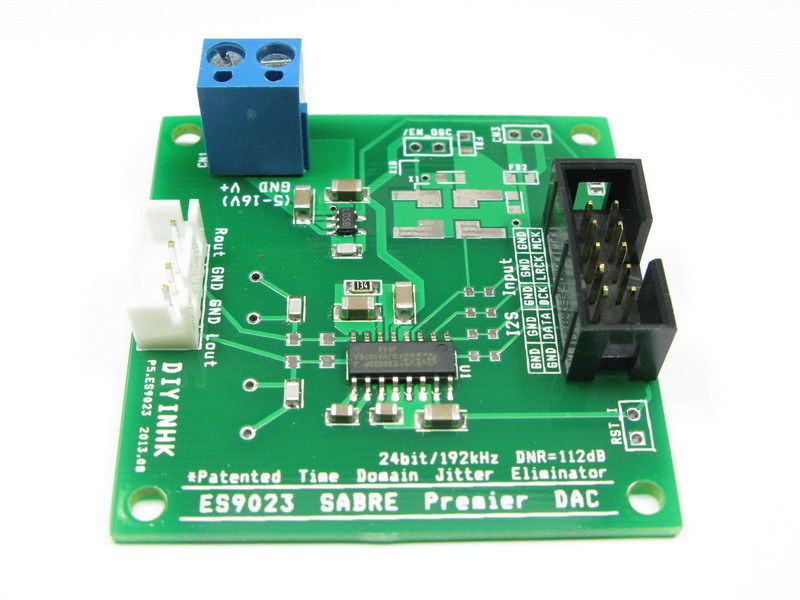
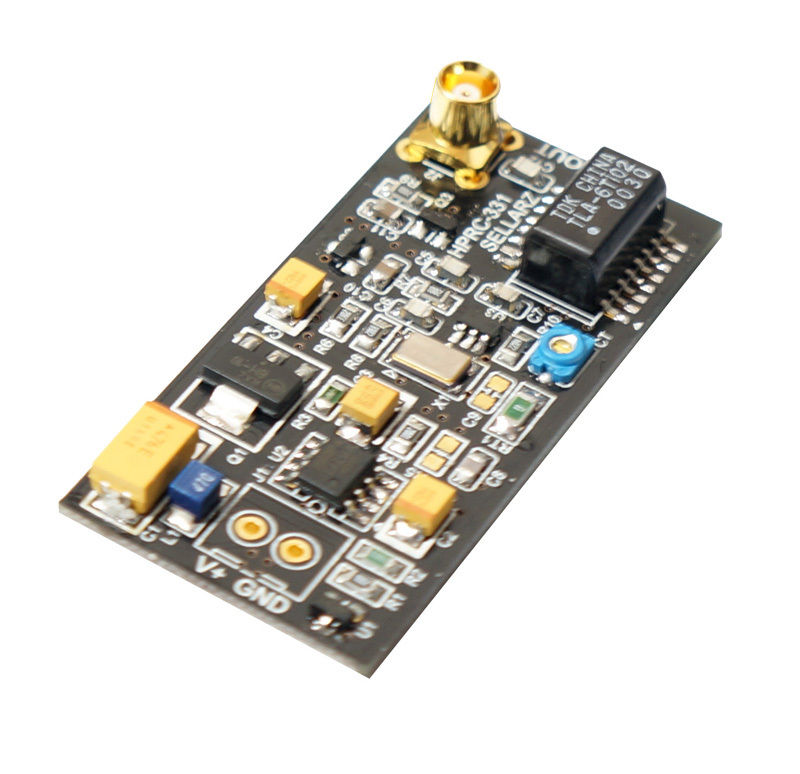
Wie die meisten von uns glauben, ist der ESS SABRE 9023 eines der interessantesten Siliziumteile überhaupt. Ich wollte schon immer einen direkt an meinen kleinen PI anschließen. Als raspberry pi i2s dac Lösung gibt es jedoch ein technisches Problem, das uns daran hindert, dies zu tun: Der Raspberry PI kann keine Master Clock liefern, die dieser DAC braucht. Also, geben wir ihm eine! Was Sie brauchen, ist ein ESS 9023 I2S DAC:
- 24Bit/192KHz ES9023 DAC mit I2S-Eingang
Von DIYINHK
- DAC-24192-ULN, 24Bit/192KHz DAC
von Sellarz Audio
Und koppeln Sie ihn mit einem Hauptuhrgenerator:
Dann speisen Sie beide mit Gleichspannung (Sie können die gleiche Schiene verwenden, wenn Sie möchten, der Bereich reicht von 7 bis 20 Volt DC). Dies sollte eine sehr effektive Lösung sein, teurer und komplizierter als die oben genannten, aber Sie werden mit Premium-Klangqualität belohnt werden. Und wenn Sie wirklich höhere Pegel erreichen wollen, und auch höhere Preise, können Sie andere ausgefallene Halbleiter anschließen:
SCHLUSSFOLGERUNGEN
Jetzt sollten Sie eine umfassende Vorstellung davon haben, warum der raspberry pi i2s dac der richtige Weg ist, wenn Sie eine ziemlich gute Klangleistung erzielen wollen, während Sie Ihre Taschen ein wenig leeren. Ich empfehle diese Lösung wirklich, wenn Sie einen wirklich wertvollen audiophilen Musikplayer wollen, ohne zu viel Geld auszugeben. Außerdem ist Volumio + PI + raspberry pi i2s DAC eine Lösung, die Sie an Ihre eigenen Bedürfnisse anpassen können. Und wenn die Entwicklung von Volumio weiter voranschreitet, werden Sie auch mehr Funktionen zur Verfügung haben.
 Der letzte Schritt ist die Aktivierung der Raspberry Pi i2s DAC Unterstützung in Volumio's WEBUI, gehe einfach zu Einstellungen -> I2S DAC -> I2S ON . Starten Sie dann Ihren PI neu und genießen Sie die subtile Freude an Ihren Einsen und Nullen, die über i2s fließen.
Ich werde bald eine vollständige Übersicht über alle in diesem Artikel erwähnten Raspberry Pi i2s DACs veröffentlichen und hoffentlich auch einige Messungen ihrer Leistungen zeigen. Bleiben Sie also dran und unterstützen Sie diese erstaunlichen Ingenieure, die uns nicht nur spannende Dinge liefern, sondern auch ihre harte Arbeit mit uns teilen!
Sie können auch über raspberry pi i2s DACS auf Volumio's Forum diskutieren
Viel Spaß!
I’m using volumio for raspberry pi on the ZERO and it makes a cool and light device, I’m using a small usb battery and it can last +9h. For the dac I’m using a cheap and small one, it sound good, found it on Amazon: https://www.amazon.com/Audio-shield-for-Raspberry-PI/dp/B00MDW602K
install intructions are here : http://www.raspiaudio.com/install
Keep up the good work!
Hi, I would like to build an active crossover with the raspberry using BruteFIR JackD and Alsa. I probably could use a not too good external USB 2.0 5.1 Soundcard. I would love to use a high quality i2s solution. Is it possible using i2s?
best, Alex
I’m about to do some R&D with the Raspberry Pi (model B which is ideal for linear PSU) with an Audiophilleo AP1 into a DAC. Anyone attempted this sort of thing yet?
I’m about to do some R&D with the Raspberry Pi (model B which ideal for linear PSU) with an Audiophilleo AP1 powered off-grid via it’s own PurePower PSU into a LampizatOr DAC. Anyone attempted this yet? I know it’s unrelated to the Volumio and headphones “compact” DACs.
Hi, I was wondering, will the next step be that you DAC is able to retrieve data direct form an SD card via I2S and with that finally be able to have NO JITTER druing transmission? You would need to develop a way to select and play music like this, but I am sure you will find a way out 😉
I have submitted the kernel driver for Duriosound which allow you to force PCM over i2s to have 32 bits. However, most of music that ripped from CD is 16bits. I have tried with cmus (application no covertion) I can play 32bits m4a file format without any issue. I will try to rip XRCD (24bits) into flac and play.
RPi-DAC is now Durio Sound
https://www.kickstarter.com/projects/463050344/durio-sound
I just
tested several i2s-DACs with RPi and finally found out, that RPi is just a good
toy. I reached the best sound so far with PRI-DAC (http://www.tjaekel.com/T-DAC/raspi.html) (single stereo). The sound is
much better than with hifiberry. But the problem is, that RPi CANNOT play 24
bit audio via i2s. 24 bits are always converted to 16 bits. The internal clock
works best with 48 and 96 kHz sample rate but not very well with 44,1 kHz. The result is jitter! The
most sellers of RPI i2s DACs out there just conceal this fact.
But, I just had a revelation. I ordered
RPI-DAC SPDIF (XMOS) from Torsten Jaekel and used CuBox-I as a player. I
connected it via usb with RPI-DAC SPDIF and RPI-DAC. The sound is absolutely
superb and much better than anything via i2s and PRi.
Maybe i2s sounds better with other boards (UDOO) but I think for me the race is over.
Asynchronous USB with a very good DAC (RPI-DAC) has won.
Hello Ralf,
I’m curious about your comments re. i2s on the RPi. I understand you to be saying that the RPi is dropping 8 bits out of all 24 bit audio passed to any DAC using the i2s interface? I’m new to all this, and very curious. How do you know this?
Thanks,
Ron
Hello Ron,
the i2s-Driver can only
support 16 bit because of the DMA. It only allows 16 bit.
But this is indeed not a
problem, because there is no audible difference between 16 and 24bit audio (http://xiph.org/~xiphmont/demo/neil-young.html)
The problem is the amount
of jitter. RPi has a poor clock.
I just build my own simple DAC
(PCM1794 single stereo) with a very simple passive I/V stage. You just need 20
parts for about $20. The sound is superb. But why? I am using an asynchronous
USB receiver (WAVE I/O) which is the best one I ever had.
Feeding all with a very
good power supply. That’s it. No voodoo! You can never reach such a sound
quality with RPi and i2s. Maybe with RPi and USB. But RPi has some problems
with USB Dacs. I use Cubox pro and Volumio. The best possible combination.
Thanks Ralf. I ran across that same xiph page yesterday–very interesting stuff. I’ve never been able to hear a difference between 16 and 24 bit, and also with higher res (>48k) sample rates, but I’m not using high end equipment. Always wondered what better ears/better equipment might hear.
Funny thing is, when I setup a Hifiberry/Pi combination, I immediately heard a difference between that and the PC/HRT Music Streamer II setup I’ve been using. The high end wasn’t nearly as nice–the Music Streamer has a nice combination of detail and softness in the highs that I really like. But the Music Streamer often pops and spits when changing sample rates, and I want to be able to play different sources without worrying about that. My little Pi/Volumio setup does it flawlessly.
So now I’m wondering if the Music Streamer might play nicer with a Volumio setup like you use, with a Cubox feeding it. I may try it out. Also, do you know much about the Beaglebone? Wondering if it has good enough USB output for what I want.
Finally, I my searches yesterday I found this, which seems to show someone figuring out 24 bit playback on the Pi i2s:
http://www.raspberrypi.org/forums/viewtopic.php?f=44&t=8496&start=500
But then this, which seems to show a software bug breaking it?
http://www.raspberrypi.org/forums/viewtopic.php?f=44&t=8496&start=575
Although, in looking just now, I think this stuff may have been centered on more recording specific stuff. My head is spinning. I just want decent playback! 🙂
Thanks again for the reply.
Ron
Wow. I already had some concerns about this but your post rings true and worrying. Especially considering Volumio and other systems that try to use Raspberry Pi with i2s dac’s and claim it brings audiophile quality… if you’re willing to ignore the fact that 24bit is being truncated to 16bit and the jitter is exceedingly high compared to even the cheapest cd players! That is a far cry from audiophile quality. I wonder why it took so long of reading before finding this information. Is everyone else on this forum unable to hear the difference, are they all pretending or is the problem not real? Gut feeling and early experiments tell me the problem is probably quite real, and Pi as a source for audio is probably a dead end.
In case I’m mistaken someone please enlighten me! This is very disappointing. Michelangelo, what’s your take on this?
Rubbish in -> Rubbish out.
If it’s a bad recording it will not matter what you listed to it through. A great recording / mastering will sound better than a terrible one at any bit rate / frequency. Yes our ears are all different and with age our hearing deteriorates but our eyes are similar – If I’m going to downsample a picture I’d rather start with a very high resolution one to start with. Does anyone still use a 1.3Mpixel camera to print photos from?
wrt the Pi I’d rather off load audio to i2s than attempt to stream (cat5 or wifi) in parallel to using a crappy USB audio stick. That’s why we’ve tried to keep our Pi-DAC+ and Pi-AMP+ prices as competitive as possible.
See also http://www.whathifi.com/news/high-resolution-audio-everything-you-need-to-know
lots of comments on that forum too.
Gordon@iqaudio:disqus.com
http://www.iqaudio.com
Thanks for replying. I agree, source material is half the story. Accurate reproduction the other half. Can you confirm/deny Ralf’s statements about the 24/16bit downsampling/truncating and, more importantly, the clock issue? Does the DAC take over the clock function and thus low jitter, or is total jitter in the end decided by the Pi clock, as Ralf suggests?
I have no idea where Ralf has got that information from or if it’s valid / invalid – I certainly haven’t read every line of linux code for i2s playback, and I’d be surprised in anyone else has recently. Maybe Florian knows – he wrote the i2s implementation. It’s also a moving carpet with code changes being incorporated / changed weekly. There was a point in time when 24bit was playing back as white noise (a software bug) which has been fixed many months ago, it was caused by a change elsewhere are not related to i2s playback as such.
I don’t understand the DMA discussion. DMA moves a chunk of memory contents from one location to another. It’s bit perfect.
The Pi clocks are not brilliant – we all know that and we have certainly done everything to make the best of what exists – from our boards you will see many components, if we wanted we could have just banged down the TI PCM5122 and wired it up – job done. In fact that was what our prototype was 🙂 The components are there for a reason.
The PCM5122 is working in slave mode and we use the DAC’s built in PLL to sort out the clock.
We’re talking £25 devices here guys – they will never match a £10k Linn streamer, but for the small investment it’ll sound much much better than a USB DAC and make you smile knowing that you can spend the remainder of the £10k on content, nice wine and holidays.
I find the fact that we’re all able to interact with the developers (software and hardware) first hand, make suggestions, help set product directions and be part of all this massive movement just mind blowing.
Oh, and if I could get away with charging £300+ for the Pi-DAC+ I would, but where would the fun be in that?
Also, the Sabre ES9023 data sheet appears to show no built in PLL so assuming the PCM5122 or similar PLL enabled DAC will have same jitter is simply invalid.
Gordon
You say that ‘it’ll sound much much better than a USB DAC’ but what is that based on? The evidence I’ve seen so far suggests the opposite. See for example this telling graph, measuring phase noise:
http://teholabs.com/docs/_media/openhifi2:i2ssources.png
Pi + i2s dac scores much worse than USB dac or an old CD player. Only USB to i2s with 2 separate external clocks (one for 44k family and one for 48k family) does better than the old CD player.
i2s may have a shorter signal path, but in the digital domain, clock quality and resulting jitter are far more important for the sound quality than signal path length.
I believe there are ways to have an external clock set the pace (if not on raspberry then on beagleboard) but as far as I know it has not been done yet for either device. Until then, both RPi and BBB come with onboard clocks that are particularly unsuitable for 44.1khz samplerate.
I know there’s no free lunches and don’t expect this setup to rival a £10k Linn streamer, but implying we should happily accept very mediocre sound quality and not worry about it because it’s cheap is a little disappointing. It should be able to rival a simple 200$ CD player at least, else it is not really a solution to anything. Fancy DACs and optimized playing software are not going to produce hifi sound if it all relies on a crappy clock that cannot produce an even 44.1k.
Hi Alex, sound much better IMHO wrt trying to share the usb bandwidth with HD audio playback / cat5 / wifi / local attached flash and a slow processor.
Using i2s on the Pi (not talking anything else here) is a better balanced architecture / split than shoving everything over usb.
My experience with usb audio hasn’t been a good one. We’ve been asked many times to take our DAC and shove a USB front end on it – it’s not something we’ve considered.
All is IMHO, YMMV etc etc etc.
I’m certainly not going to throw 4star on to any religious war.
G
Can Volumio support the new Wolfson card?
Where is also a Wolfson HD audio card for the Raspberry Pi: http://linuxgizmos.com/raspberry-pi-gains-wolfson-high-def-audio-card/
This is the easy soultion for anyone who wants good sound with a Pi.
Please get your facts straight guys. This is not going to work with a WM8741, it specifically states in the datasheet: “The master clock should be : “synchronised with LRCLK, although the WM8741 is tolerant of phase differences or jitter on this
clock”.
This means: you can`t just add some masterclock from anywhere, or any pcb or whatever, that you like. It would help if Udoo, Raspberry etc had Masterclock inputs, but they sadly use pll`s and division circuitry etc to derive BCK and WCK from some onboard clock somewhere.
The ES9018 & 9023 are different animals though, should work flawlessly, espescially if the masterclock is at least 192 times the input samplerate. Goodluck.
Thanks!
Do you know any (cheap) single-board computer with proper Masterclock inputs?
I wouldn’t know of any that do, but I also don’t know all boards. It would be surprising if one would support it though.
The whole I2S-story here is, in my opinion, a bit incomplete.
I2S is indeed the only protocol dac-chips use, the only exception is DSD, but that’s besides the point. The thing with i2s is though, that the exact sample rate has to be given to the dac, as well as timing problems (read:jitter) have to be of outstanding quality, to make a dac sound well, as well as measure well. What makes the Rpi, or maybe any board for that matter, flawed for serious audiophiles, is the used master clocks (or clock to be precise). It is not exactly 44K1 KHz, and the music sounds slower than it should. This is also a software issue, which uses a 19.2MHz clock to generate 44K1. That’s hard to do. I haven’t measured it, but there was a distinct difference between the direct i2s-out and an Amanero Usb->i2s board to connect to an ES9018. Those are just some things that are just as important to the perceived sound quality as leaving a few steps out in the interfacing..
My 2 cents.
Thanks once again. You seem to know what you are talking about. You might already have made some similar builds.
Question, would:
Rpi > Amanero USB I2S > ES9018 (DAC-24192-ULN)
output better audio than
Rpi > HPRC-331 audio clock > ES9018 (DAC-24192-ULN)
?
Or am I misunderstanding something here …
ny_tid, you’re understanding perfectly!
I am not a big fan of the Rpi, because of the undocumented resolution that can be played without hickups and clicks, which also seem to change wether using Usb or i2s. I would definitely recommend using an Amanero, or similar, in between, but hesitation kicks in advising this as Usb-problems with Rpi come to mind. A real , usable, advice would be to use an Udoo or Cubic I, combined with an Amanero. It rocks!
Looking at the current versions, the Cubic would be best, as it already has version 1.2 of Volumio.
I wish the guys developing this awesome product would give a little bit more insight about the status of developing on the various boards.
Ok, we are getting somewhere. Thanks!
I might join the Volumio forum. But for now I will continue here 😉
As the options increases, so does the confusion of what to choose.
So you claim that even the clever workaround that doesn’t use the unreliable USB on Rpi, but the onboard I2S will still be unpredictable?
How reliable is the CuBox-i’s USB, I2S and S/PDIF outputs? What would be the best path to a quality DAC from CuBox-i?
Is it’s USB reliable, or should the trick with going via extra an audio clock to I2S be applied again?
I see these basic scenarios for good audio in the context we are talking about:
1.
CuBox-i > Amanero USB I2S > ES9018 (DAC-24192-ULN)
2.
CuBox-i > HPRC-331 audio clock > ES9018 (DAC-24192-ULN)
3.
CuBox-i > off the shelf comerical DAC, but which interface, USB or S/PDIF?
4.
CuBox-i > HiFi amplifier with inbuilt DAC
I am also in the need of an amplifier. And I love small form factor. TEAC are renowned for their good quality at a reasonable price and well sounding. And I noticed that their network amplifier NP-H750 has got an inbuilt USB DAC (BurrBrown PCM1795). But it might not be compatible with Linux. S/PDIF might be safer.
http://www.teac.com/product/np-h750/
But of course, if the CuBox-i’s audio system works well, then a “dumb” amplifier with no modern network features will work just fine.
CuBox-i Hardware Wiki
http://imx.solid-run.com/wiki/index.php?title=CuBox-i_Hardware
ny_tid, I claim the Rpi to be unreliable in any case: where are the thorough test results of playing high-res files without hickups? At which resolution? It is being said it plays better now, but i see nobody claiming any steady results, let alone playing DSD or doing any upsampling. As a testplatform and as a study object the Rpi has been a real breakthrough, exemplary even, but I am afraid that it will stay at that level, the platform is just not powerfull enough to go beyond or be really flexible in other resolutions than cd, or a little above. Another thing is that, despite clever workarounds being made for Rpi, other boards are just usable out of the box, for almost the same price.
Anyway, it`s really good for experimenting and there is a big community.
I bought a Udoo Quad, with the idea that it could replace the Atmel controller to control the ES9018 ,and at the same time have Volumio on it. One board, 2 functions. turns out, it`s rather hard to develop code on the Udoo. It is really slow uploading code to it, has problems connecting, lacks an Eeprom and some other things, which all of a sudden doesn`t make it such an ideal piece of pcb anymore. But it does really well with Volumio. There are still some things that don`t work well on it, restarting MPD Deamon always hangs the darn thing and upsampling doesn`t want to be put in medium or higher quality settings, just to name a few. But it does play all the way to 384 KHz, 32 bits, plays DSD64, DSD128 and upsamples (again: low quality settings) every pcm format all the way up to 384 KHz. So what do I think of the Rpi in comparison? Gues..
The Cubox I is based on the same Freescale soc, so I take it the results will be the same as with the Udoo board, but I haven`t tested it, maybe someone here can verify? It also has a much newer version of Volumio, so it might also be stable restarting MPD Deamon and support higher quality upsampling. All things being said and if you want to spare waiting for other people`s testing or verification I would suggest buying a Udoo Quad and an Amanero board. Let`s hope the guys from Volumio here are ready soon with a new version for it as well. The Sabre ES9018 will rock, especially with a good onboard clock ( e.g. a Crystek 100 MHz, well known in the DIY-community). Don`t forget to look for a very good power supply for the 9018, or tweak it yourself and set the kernel setting for Volumio to Orion. It makes all the difference!
Good input again Marco
I fully respect the Rpi, but it’s been designed to be the cheapest usable board possible. So if you are demanding high quality, then Udoo or Cubox looks more fitting for this task.
As you didn’t really reply to my questions. I rephrase it. How would you (in more detail) build your (dream) digital HiFi player/DAC? Which ES9018 card, which interface etc?
What PSU do you recommend for this project?
I am leaning more towards Cubox ;), but as you write it might suffer from the same problems as Udoo does. Or maybe not with the new version of Volumio. Who knows.
Sorry for the delay, but in short: build everything yourself. There are no already made/buyable on ebay solutions that do everything right. Layout, choice of components etc must all be cherry picked to get the most out of every piece of audio equipment. Regarding interface formats: use i2s if pcm is your source, use dsd if that`s what you`re playing, but don`t convert one to the other just to make a sound. Use parts with certain flavours to do that. Best yet: choose the most neutral ones. Cerafine, Allen Bradley, linear power supplies, etc are all a great choice of basic parts. Just listen. Anyway: listening, comparing and verifying is key. Regarding digital: I
`m suspecting low EMC emissions and/or low power devices for whatever reason make the best source. Volumio is excellent for this, but sound character,flow of music etc is also depending heavily on it`s power supply, as well as its software settings. Cheers!
Marko, I just saw your remarks but too late: I already got the WM8741 board and indeed I am having important distortion problems, especially using Volumio (1.4). When i use Wheezy with the software mixer, the distortion is significantly less if I bring down the volume to 70% but still the sound is not very good.
I am using a rather simple USB to I2S board from DIYINHK and this board works well with other I2S DACs. In your view, is there a way to make the WM8741 work with the RPi?
Hi guussie,
If you”re having problems with normal audio files (no high-res etc.), and it’s is not a known bug of Volumio (I don’t follow these issues), and you use the Usb output with an Rpi or similar, then in your case I suspect there’s something wrong with your interconnects. E.g. does the distorted sound change when you fiddle with the wires that go from the DIYINHK to the WM8741?
How long are those wires? All power supplieswithin range/stable etc?
If there are no known bugs with the new software, I guess it should just work fine, regardless of the nice price of DYINHK..;)
Hi Marko,
I was indeed having some problems with my interconnects before but I eliminated those. The cable length is about 10cm (I am using a standard flat cable). Power supply is OK. I have tried with batteries and this does not change anything.
I have the same problem whether I use mpd or mplayer. But strangely, the distortion is much more significant when I use Volumio.
If the problem is indeed related to a characteristic of the WM8741 and the USB–>I2S board does not address this issue, then there may not be a solution.
The manufacturer of the board is also looking into this and is very helpful.
Weird. This may be very hard to fix, without being able to use hands etc.
The flat cable has ground wires isolating the mclk from the bclk etc?
What does come to mind is that, because volume control does change the amount of distortion, it may be that either the dac isn’t adjusted to the output of-, or Volumio isn’t to the DIYIHK. The amount of mismatch can, that way, change with volume. I guess you could change output resolution (16-32 bits) on the pc, and on Volumio if possible with an Rpi, and also change the expected bits on the WM board. That should do it.
Another thing: distortion is common with not enough power supply for the opamps after the WM-module, but that shouldn’t be the problem since it seems it’s more software related. On the other hand: you always have distortion problems, so it might be a combination of both …
G’luck!
i am trying to connnect tlv320aic23 chip to raspberry… the problem i m getting is swapping in both channel data…so can any1 help me out….
Ouch! I would like to build “The Third Way” so bad my brain hurts! I am no audio engineer and I guess I will need a lot of guidance. I found your site after reading about making a Squeezebox compatible device (Logitech Media Server) and googling for a good DAC for Raspberry Pi. I am curious to try piCorePlayer & RaspyFi / Volumio: http://www.head-fi.org/t/681593
I don’t have all the equipment.
What do I need to build it? Solder iron? If so what kind? Voltmeter?
How do I know if a power supply is good, test it with an oscilloscope? Do you have any advice for power supplies for this project?
I want to put it all in an enclosure. Is there a quality difference in RCA connectors? If so where do I find good and cheap ones? Any disadvantages for having the PSU inside the enclosure? Or would it be better with an USB connector on the outside of the enclosure forwarding to Raspberry Pi board?
http://www.ebay.com/sch/i.html?_from=R40&_nkw=%28Case%2C+enclosure%2C+enclosures%2C+Cabinet%2C+Enclosure%29&_sacat=122649
What about WiFi support?
I also would like to find a company in Europe for angled USB cables. Like this one i US http://www.angledcables.com
And thanks for all the information!
There’s also the http://www.element14.com/community/community/raspberry-pi/raspberry-pi-accessories/wolfson_pi
(I haven’t tried *any* I2S cards on my Pi, just informing you of another option I’ve seen!)
The third way- how do you know which clock freq to pick?
For the ES9023 and -18, this rule applies:
Minimum clock frequency is sample rate times 192, so if you want to play a maximum sample frequency of 96KHz you need a minimum clock of 19MHz or so. If you want a really good clock, you could choose one like this, which is about €20 at Digikey or Mouser:
http://www.crystek.com/home/oscillator/clockdetail.aspx?pn=CCHD-957
Btw: you don’t need an exact multiple of the sample frequency with a Sabre DAC, you can also choose 27MHz, 35 or whatever.
Hi Mikelangeloz
Do you have a new version of Volumio that support I2S?
At the download place I only see version 1.1 !
thanks in advance
Bjarne