

Dear Friends,
I’m proud to announce a new version of Volumio Audiophile Music Player. The development of this new release is including some contributions by Volumio’s users. This is the very first good news, and it seems really important to me to thank all the people who submitted bug reports, code, suggestions and improvements. The community is a key part in what Volumio is now, and you guys are definetely supporting it in a smart and passionate way. Thanks for that.
And now, let’s see what this new version brings to Volumio:
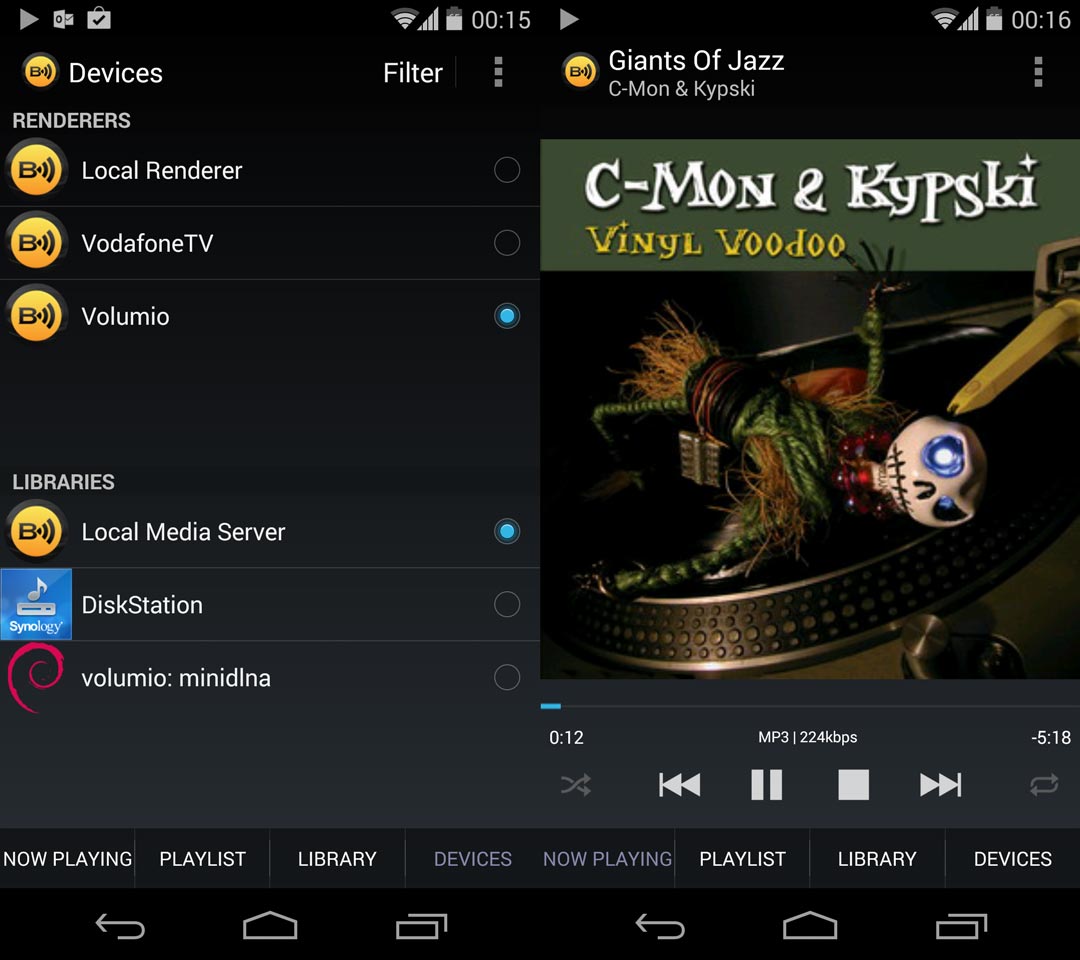
- UPNP \ DLNA Control Capability: Now you can control Volumio via a UPNP \ DLNA client. That means that you can stream music to your Hi-Fi setup via your smartphone, Smart-TV, Tablet, PC and much more devices. You can also use UPNP clients as an alternative to Volumio’s WebUI. I’m using it with BubbleUPNP, an excellent Android APP. Just select Volumio from Available UPNP devices (make sure you’re connected to the same network) and hit play on your favourite tunes. This was made possible by integrating an excellent MPD add-on: Upmpdcli by Hiéro. It works flawlessly with Volumio, even if you’re already playing your local Music.
- Improved Airport performances: you’ll find latest Shairport Version, which will better integrate into Volumio. Now you can start Airplay playback even in playback mode, the system will simply switch to Airport. Also, you can output Airport playback on your desired DAC, just select it in output device and you’re good to go.
- Browse your DLNA\UPNP Music: you can activate UPNP \ DLNA music indexing, just go to settings, and activate the UPNP indexing service. This will index all the tunes served by DLNA Servers. This is not enabled by defaults, since it will take a lot of time to Volumio to index all your tunes.
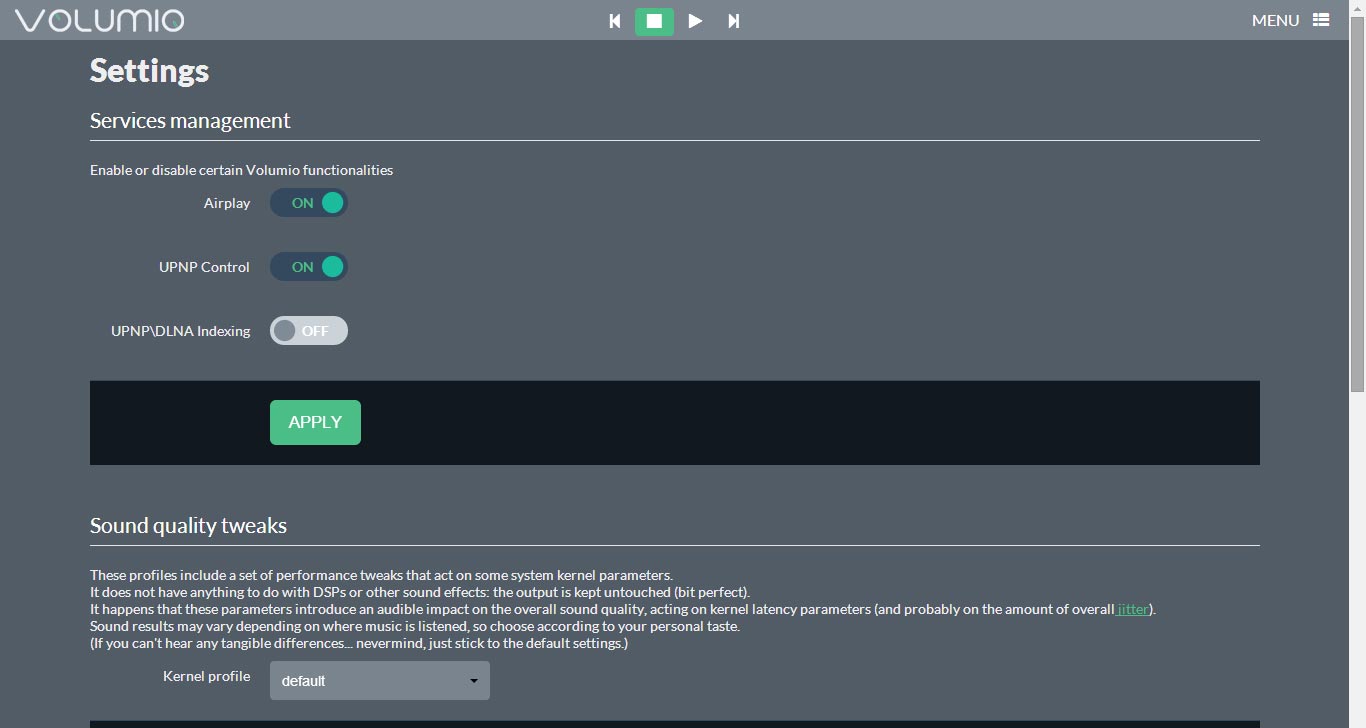
- Features management: Want to obtain the best from your Volumio setup and disable unneeded services? Here you are, in the system tab you’ll find an handy services selector.
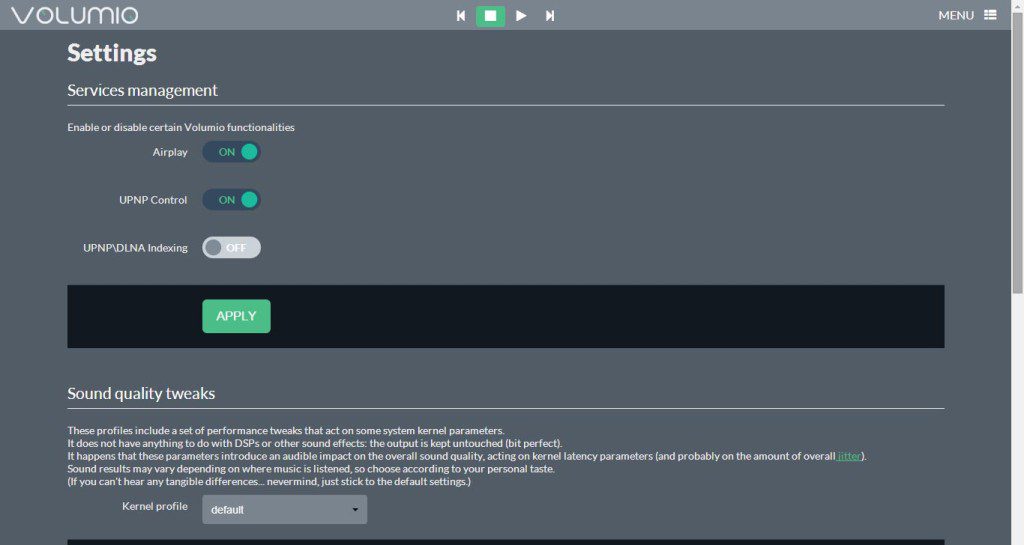
Volumio-Settings
- Library Browsing Tab: For those of you who just miss a complete overview of their library, divided by genres, artists and so on Volumio’s community member Jotak developed this UX refinement. Ça va sans dire, a valuable addition. Plus you’ll find some other UX improvements.
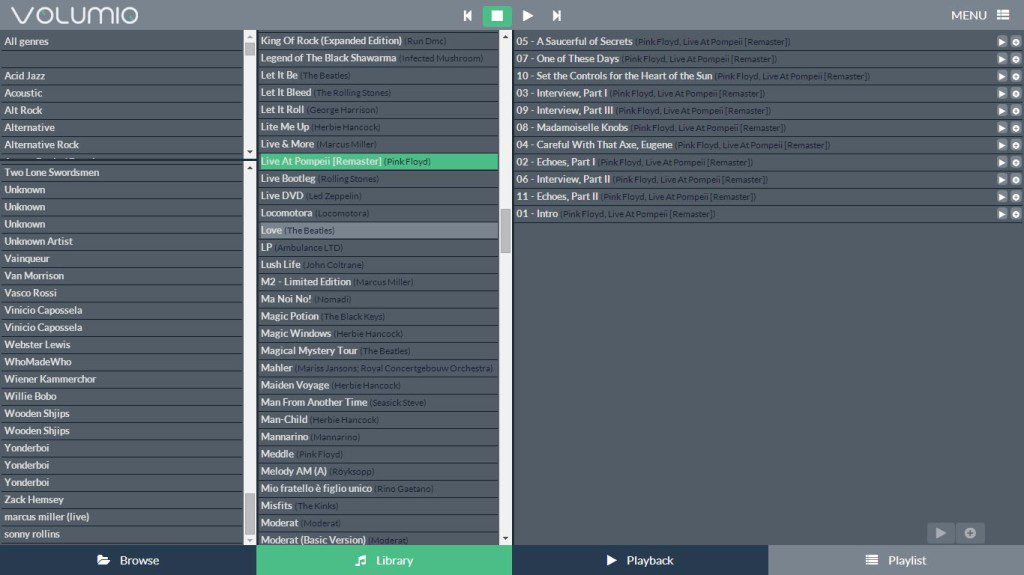
Volumio-library
- System stability improved: Now Volumio will almost failure proof. I’ve integrated several stability fixes, and now the system checks periodically its status, and if something goes wrong it just returns to normal operating conditions. Plus I’ve addressed some ALSA bugs, which for example was setting output device to mute. No need to log in with SSH, it just works.
- I2S DACs compatibility out of the box: thanks to Raspberry PI’s I2S DACs we can reach our Audiophile heaven with very few bucks. Volumio is compatible with the most famous ones: Hifiberry, Hifiberry DIGI, RASPYPLAY3, RPI-DAC and IQ-AUDIO. Just plug your I2S friend on your PI and activate its driver from the Menu. After a reboot your PI will be singing like never before. Want to use the brand new Wolfson Audio Card? Even if it is not officially supported as of now, there’s an easy procedure to make it work with Volumio.
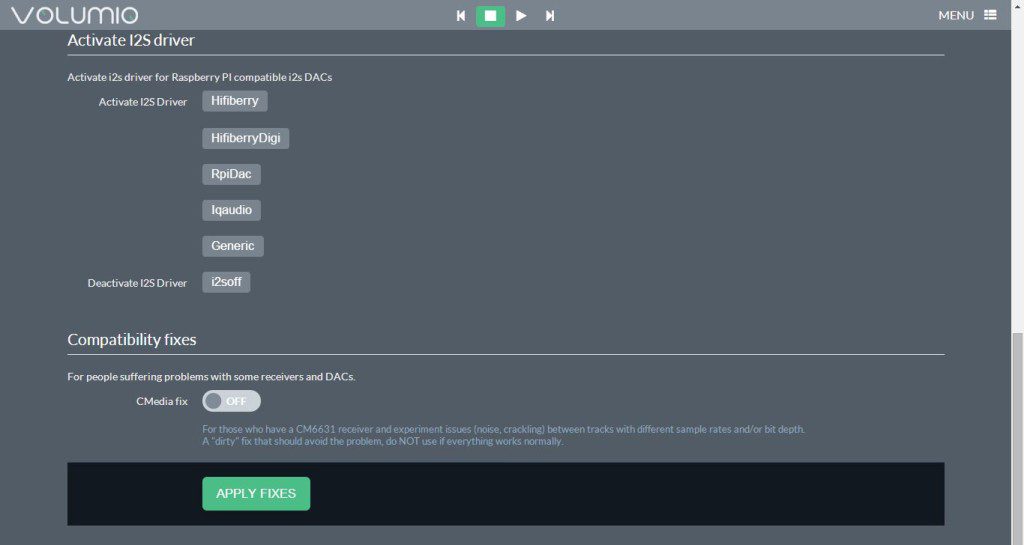
Volumio-I2S
- Cubietruck Porting completed: finally, all those waiting for their Cubie to sing, the time has come. I’ve complete the porting (which was quite challenging…) and I’ll upload the image in the next days.
All Volumio supported platforms will receive 1.4 Update in the next week. You can check at the Download section and grab your favourite Audiophile Music Player. Enjoy!
Can Volumio render video as well as audio with the new upnp support?
Still no v1.4 image for the original Cubox – please can you publish one…
It would be nice if the UI could detect when it was being served to a mobile browser and hide the library tab, which as others have said is useless on a smartphone screen.
Also (can’t test in v1.4 till a Cubox image comes out) in v1.2 I just noticed the other day filenames with non-ascii characters seem to be ignored, I had to rename a whole load of files with French accented words in the filenames to get Volumio to recognise them. Would be nice if this could be fixed.
I hope we’ll see support for the Hummingbird board from SolidRun. I have mine on pre-order. Is there any ETA for when support might be available for the hummingbird board?
Hi, I wonder if you have any recommendations for a DNLA/UPNP ios app? I want to have a home server, 3 cubox-i controlled by an iPad able to play in any rooms and with synchronous playback, is that possible? Big donation if it is 😀
Yes, it is. Since I think others may be interested in it (even if it is in experimental phase) just jump in the forum and open a thread for that. I’ll guide you to achieve this.
Hi, after installing 1.4 i started to hear cracks when I hear music. This happens not only when I play my USB Hard drive files but when I play Webradio too. I did not have any sound issues (carcks) with 1.2 version. I played with different settings but it did not help. Please advice what should I do. It is very annoying… BTW> Thanks for your work:)
Ciao Michelangelo,
Ci sara un’altra versione per l’Utilite?
Grazie mille!
Keen to try the cubox-i version of 1.4.
I’ve problem to install pckages via apt-get (wicd-curses), works fine in older volumio, is there a version problem with repository??
thanks!!!
Firts, do sudo apt-get update, then install what you need.
If you’re having problems, just change the repo in /etc/apt/sources.list from wheezy to jessie
Let me know
yes, seem to work with jessie 🙂
thank you very much!!
I love your distro for audio source and traffic routing:)
great news !!!! thanks for your work !
I have already install a upnp render and suqezeeite on the 1.2 version of volumio but not without some problems and crash…
I have juste one request : a youtube module.
EDIT : if you have a Android rooted Device download Allstream, this app Streaming the sound output of your phone youtube, dezzer… and It’s free ! https://play.google.com/store/apps/details?id=com.kineticgamestudios.airtunes.android
Ok so my PHIREE D1 work weel with the volumio 1.4 but squeezelite make crash mpd…
The “new” in 1.4 has some serious regression bugs. The new library tab imho is completely useless if you try to use it on a mobile device and the playlist tab isn’t shown on small screens anymore. Sometimes I can’t change into a directory when browsing my normal folder view through the webinterface. All of this worked fine with volumio 1.2. Also I think that it is really disapointing that you still need to manually install the cifs-utils package and than figure out the UI bug that leads volumio to try to mount with the “noatime” option, which isn’t supported. Before adding more features (like the upnp) support, which is great don’t get me wrong, the UI bugs should really be worked out.
Hi Kai, understand your concerns. The Ui additions are intended to work, as of now, just on PC browsers. I think this is a valuable addition, which can be of course improved. First things it needs is just being responsive, on that I agree with you.
The, for the cifs, I am working on that. The solution you are referring just doesn’t work on all systems, so implementing it would mean preventing other users from mounting the NAS. What I’m doing, while you read, is rewrite completely the NAS mounting mechanism. This will be simpler and it will just works.
Keep posting feedbacks, they are really important to foster Volumio quality!
Maybe implement an option where you can turn off the elements one doesn’t need? The main problem right now is, that the ui just stopped working for me completely. The buttons dont work and I can’t add songs to the playlist. I tried it with Firefox and Chrome on Linux and Mac, and with Chrome on Android. All have the same problems. I tried some debugging, but couldn’t get to the source of the problem. I can however provide you with any information that you might need to fix the problem. Just ask 🙂
Nice! How can i easily update from 1.2?
No way to update, as of now. Just download and reflash the new image.
so i tried to avod this… finally reflashed it
thx
How about using webuiupdate.sh?
What are the differences from refresh the new image to using webuiupdate.sh?
The webui update.sh updates only the WebUI. In this case doing just that will result in a incomplete system, since there are updated and new packages to be installed. So, for example, you will end up with non working shairport (since new version uses different execution syntax) and no UPNP or DLNA support.
Webuiupdate works only if the RootFS (the filesystem) is the same, this happens for example with bugfixes versions like 1.3 and 1.3bis.
You should integrate the FM transmitter possibilities of the Raspberry Pi 🙂 Give a warning about local regulations though. http://www.reddit.com/r/raspberry_pi/comments/2844k1/how_to_build_a_fm_radio_with_raspberry_pi_5_min/
Sorry, but I don’t think this will ever make its way into Volumio. FM quality is just too bad, and we’ll require some specific hardware to do that. Furthermore, don’t want the FEDs to know at the doors of Volumio users lol!
Excellent! I’ve been trying to implement an “activate airplay” button since I received my UDOO board, but it turned out to be highly unstable (constant crashes and lots of “packet resend” problems). It is great that finally we’re having this integrated into de UI. 😀
Great. Can’t wait to try it out.